


Free SC-401 pdf Files With Updated and Accurate Dumps Training
Top-Class SC-401 Question Answers Study Guide
NEW QUESTION # 36
You have a Microsoft SharePoint Online site named Site! that contains the files shown in the following table.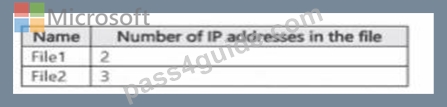
You have a data loss prevention (DLP) policy named DLP1 that has the advanced DLP rules shown in the following table.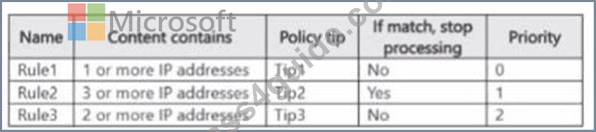
You apply DLP1 toSite1.
Which policy tips will appear for File2?
- A. Tip3 only
- B. Tip2 only
- C. Tip1 and Tip2 only
- D. Tip1 only
Answer: B
Explanation:
Comprehensive Detailed Explanation with References
Step 1 - Review File2 contents
File2 contains 3 IP addresses.
Step 2 - Review DLP rules and priorities
RuleConditionPolicy TipStop Processing?Priority
Rule11 or more IP addressesTip1No0
Rule23 or more IP addressesTip2Yes1
Rule32 or more IP addressesTip3No2
Step 3 - Rule evaluation order
Advanced DLP rules are processed by priority order (lowest number first).
Rule1 (Priority 0) will trigger because File2 has at least 1 IP address.
This applies Tip1.
However, Rule1 has Stop Processing = No, so evaluation continues.
Rule2 (Priority 1) will also trigger because File2 has 3 IP addresses (#3).
This applies Tip2.
Rule2 has Stop Processing = Yes, so evaluation stops after this.
Rule3 (Priority 2) will not be evaluated because Rule2 stopped processing.
Step 4 - Final outcome
File2 matches Rule1 (Tip1), but since Rule2 fires afterward with Stop Processing = Yes, only Tip2 is applied.
Step 5 - Microsoft Reference
From Microsoft docs: "When a rule is configured to stop processing, subsequent rules are not evaluated and only the policy tip from the last triggered rule with stop processing applies." Reference: Order of rule processing in DLP policies
NEW QUESTION # 37
HOTSPOT
You have a Microsoft 365 subscription.
You plan to deploy an audit log retention policy.
You need to perform a search to validate whether the policy will be applied to the intended entries.
Which two fields should you configure for the search? To answer, select the appropriate fields in the answer area.
NOTE: Each correct selection is worth one point.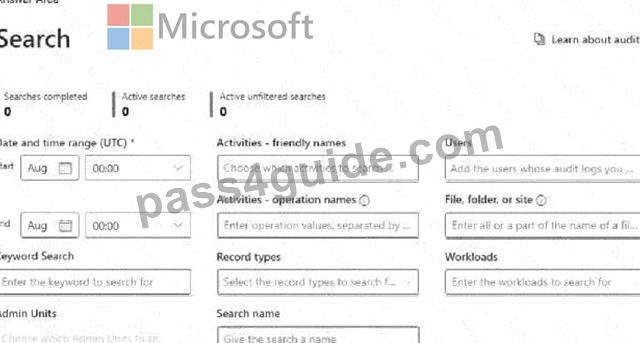
Answer:
Explanation: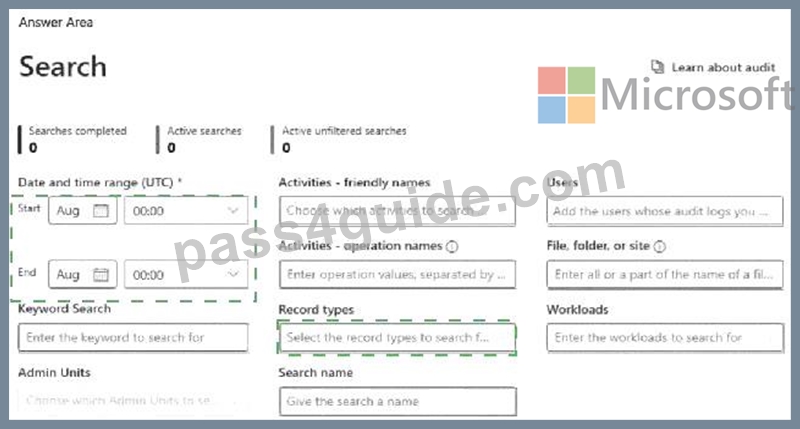
Explanation:
To validate whether an audit log retention policy will apply to the intended entries, you should configure the following fields:
# Date and time range (UTC) ensures that you are searching for audit logs within the time period when the policy should be applied. Audit logs are time-sensitive, and policies affect logs based on their timestamp.
# Record types allows you to filter and search for specific audit log categories (e.g., Exchange, SharePoint, Teams, etc.) that are affected by the retention policy. Selecting the correct record type ensures that the policy is evaluated against the relevant data.
NEW QUESTION # 38
You have a Microsoft 365 E5 subscription that contains a trainable classifier named Trainable1.
You plan to create the items shown in the following table.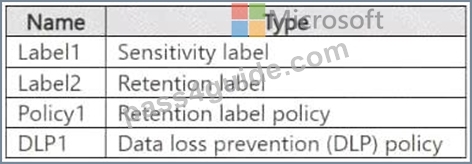
Which items can use Trainable 1?
- A. Label1 and Policy1 only
- B. Label1 and Label2 only
- C. Label2 only
- D. Label1, Label2, Policy1, and DLP1
- E. Label2, Policy1, and DLP1 only
Answer: E
Explanation:
A trainable classifier in Microsoft Purview is used to automatically identify and classify unstructured data based on content patterns. The classifier can be used in:
1. Retention Labels (Label2) # Supported
# Trainable classifiers can be linked to retention labels to automatically classify and apply retention policies to documents.
2. Retention Label Policies (Policy1) # Supported
# Retention label policies define how and where retention labels are applied, including automatically using trainable classifiers.
3. Data Loss Prevention (DLP) Policies (DLP1) # Supported
# Trainable classifiers can be used in DLP policies to detect and protect sensitive content automatically.
NEW QUESTION # 39
You have a Microsoft 365 E5 subscription.
You need to identify documents that contain patent application numbers containing the letters PA followed by eight digits, for example, PA 12345678. The solution must minimize administrative effort.
What should you do? To answer, select the appropriate options in the answer area.
NOTE: Each correct selection is worth one point.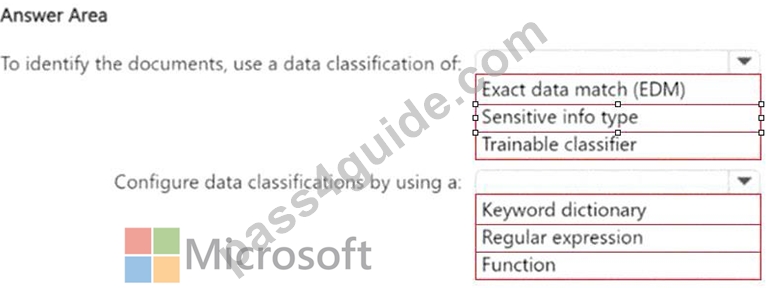
Answer:
Explanation: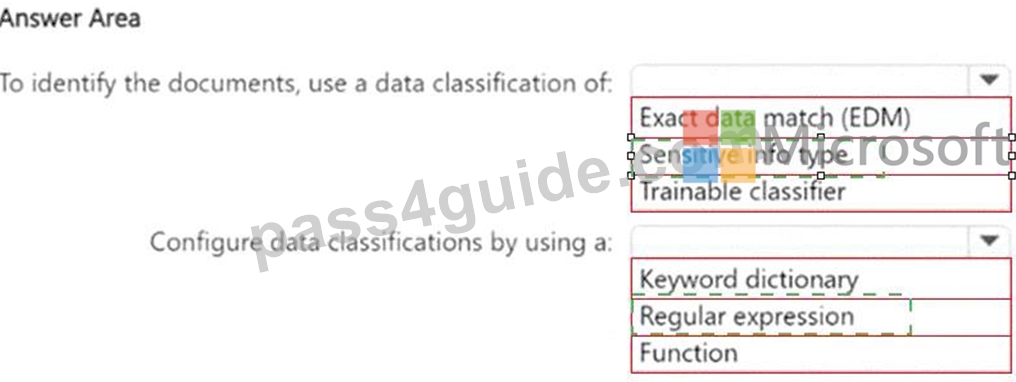
Explanation:
Box 1: Since you are looking for a specific pattern (PA followed by eight digits, e.g., PA 12345678), the best classification method is Sensitive Info Type. Sensitive Info Types allow pattern-based matching to identify structured data. Exact Data Match (EDM) is not needed because you're not comparing against a fixed dataset.
Trainable classifier is not appropriate because this is a structured pattern, not an unstructured document classification.
Box 2: Since PA 12345678 follows a structured pattern, the most effective method is Regular Expression (Regex). A Regular Expression (Regex) can be written to match "PA" followed by exactly eight digits (e.g., PA\s\d{8}). Keyword dictionary is not ideal because it works for predefined words, not number patterns.
Function is unnecessary because there is no need for checksum validation or predefined validation rules.
NEW QUESTION # 40
You have a Microsoft 36S ES subscription that contains the devices shown in the following table.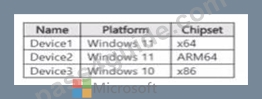
You publish Microsoft Purview Information Protection sensitivity labels.
You plan to deploy the information protection client to the devices. The solution must ensure that the labels can be applied to sensitive images and documents On which devices can you install the information protection client, and what should users use to apply labels?
To answer, select the appropriate options in the answer area.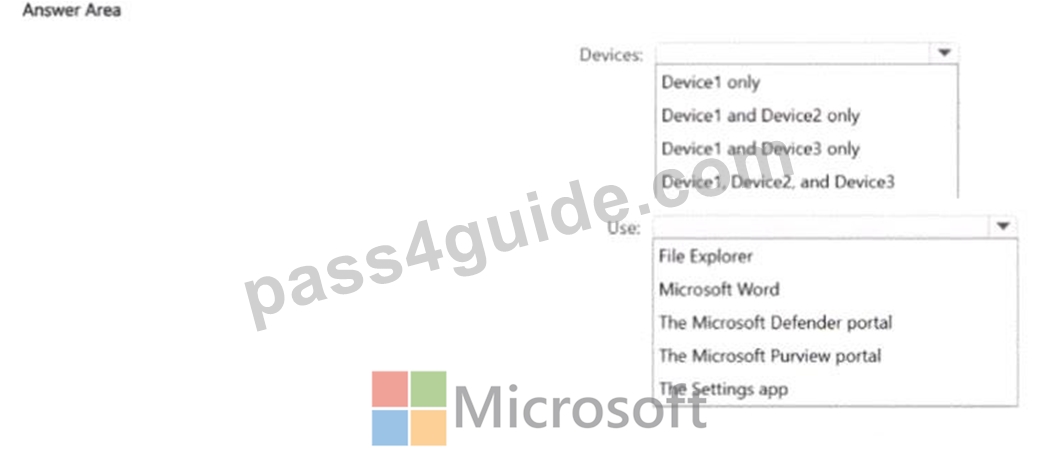
Answer:
Explanation: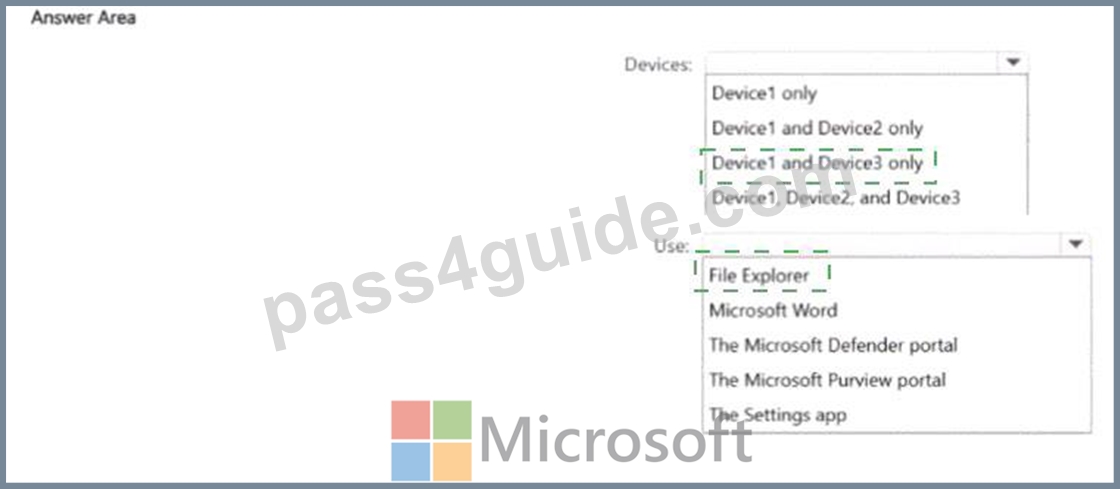
Explanation:
NEW QUESTION # 41
You are planning a data loss prevention (DLP) solution that will apply to Windows Client computers.
You need to ensure that when users attempt to copy a file that contains sensitive information to a USB storage device, the following requirements are met:
*If the users are members of a group named Group1, the users must be allowed to copy the file, and an event must be recorded in the audit log.
*All other users must be blocked from copying the file.
What should you create?
- A. one DLP policy that contains one DLP rule
- B. one DLP policy that contains two DLP rules
- C. two DLP policies that each contains one DLP rule
Answer: B
Explanation:
To meet the requirements, you need one DLP policy with two separate DLP rules to handle the different conditions:
1. First DLP Rule (For Group1 Members): If the user is a member of Group1 and attempts to copy a file with sensitive data to a USB storage device. Allow the file copy but log the event in the audit log.
2. Second DLP Rule (For All Other Users): If any user who is NOT in Group1 attempts to copy a file with sensitive data to a USB storage device. Block the file transfer.
NEW QUESTION # 42
You have a Microsoft 365 E5 subscription.
You plan to implement insider risk management for users that manage sensitive data associated with a project.
You need to create a protection policy for the users. The solution must meet the following requirements:
# Minimize the impact on users who are NOT part of the project.
# Minimize administrative effort.
What should you do first?
- A. From the Microsoft Entra admin center, create a security group.
C From the Microsoft Entra admin center create a User risk policy
D From the Microsoft Purview portal create a priority user group - B. From the Microsoft Purview portal, create an insider risk management policy.
Answer: A
Explanation:
To implement insider risk management for users managing sensitive project data while minimizing the impact on other users and reducing administrative effort, you should first create a security group in Microsoft Entra ID (formerly Azure AD).
Security groups allow you to scope insider risk management policies to specific users instead of applying policies to all users, which helps in minimizing unnecessary alerts and reducing administrative overhead.
After creating the security group, you can assign this group to a Microsoft Purview Insider Risk Management policy, ensuring that only project-related users are affected.
NEW QUESTION # 43
You have a Microsoft J65 E5 subscription that contains a user named User1.
All users are assigned Microsoft 365 Copilot licenses.
You deploy Microsoft Purview Data Security Posture Management for Al (DSPM for Al).
You need to ensure that User1 can analyze prompts and responses for Al interaction events. The solution must follow the principle of least privilege.
To which two role groups should you add User1? Each correct answer presents part of the solution.
NOTE; Each correct selection is worth one point.
- A. Insider Risk Management Investigators
- B. Content Explorer list Viewer
- C. Security Reader
- D. Content Explorer Content Viewer
- E. Information Protection Analysts
Answer: B,E
Explanation:
The requirement is that User1 must be able to analyze prompts and responses for AI interaction events in Microsoft Purview DSPM for AI, while following the principle of least privilege.
Information Protection Analysts role group:
Members can review and analyze sensitive data activity, including AI interaction events collected by Purview DSPM. This role is specifically intended for analysts monitoring sensitive information and is therefore necessary for User1.
Content Explorer List Viewer role group:
Members can see metadata about items with sensitive information, such as file names, locations, sensitivity labels, and policy matches, without accessing the actual file content. This provides the required visibility for AI-related data classification and interaction analysis while adhering to the least privilege principle.
Roles not required:
Content Explorer Content Viewer would give the ability to view the actual content of files, which is more access than needed.
Security Reader is intended for reviewing alerts and incidents but not for analyzing AI prompts and responses.
Insider Risk Management Investigators focus on insider risk investigations, not AI event analysis.
References:
Microsoft Learn: Microsoft Purview compliance portal permissions
Microsoft Learn: Use Content Explorer in data classification
NEW QUESTION # 44
You have a data loss prevention (DLP) policy configured for endpoints as shown in the following exhibit.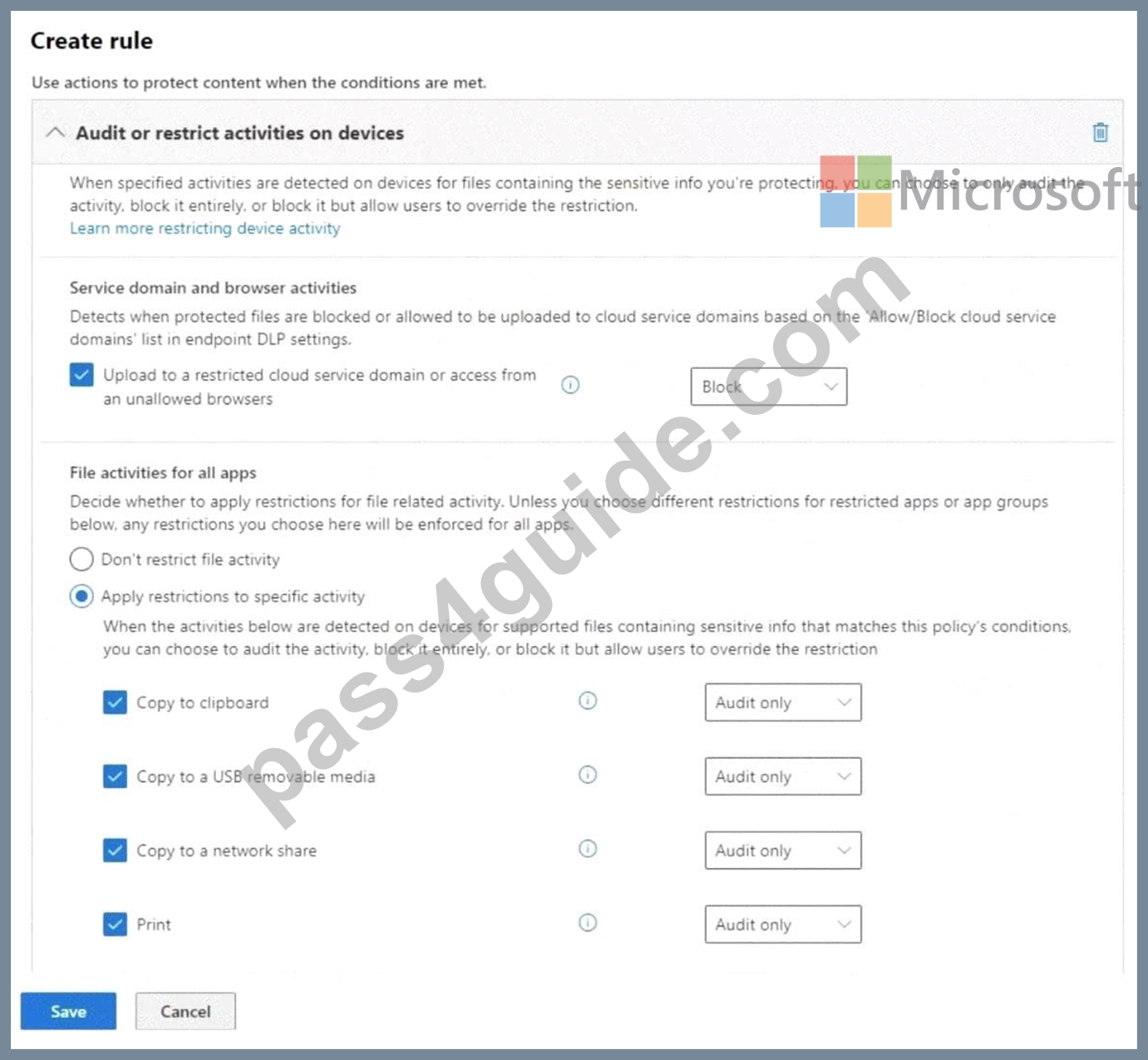
From a computer named Computer1, a user can sometimes upload files to cloud services and sometimes cannot. Other users experience the same issue.
What are two possible causes of the issue? Each correct answer presents a complete solution.
NOTE: Each correct selection is worth one point.
- A. The Copy to clipboard action is set to Audit only.
- B. The computers are NOT onboarded to Microsoft Purview.
- C. The Access by restricted apps action is set to Audit only.
- D. There are file path exclusions in the Microsoft 365 Endpoint data loss prevention (Endpoint DLP) settings.
- E. The unallowed browsers in the Microsoft 365 Endpoint data loss prevention (Endpoint DLP) settings are NOT configured.
Answer: D,E
Explanation:
The issue where users sometimes can upload files to cloud services and sometimes cannot suggests inconsistent enforcement of Endpoint DLP policies. This can be caused by the unallowed browsers in the Microsoft 365 Endpoint DLP settings are NOT configured. Also, there are file path exclusions in the Microsoft 365 Endpoint DLP settings.
Endpoint DLP can block uploads only when using unallowed browsers. If unallowed browsers are not configured, users might be able to bypass restrictions by switching to a different browser. This could explain why uploads sometimes work and sometimes don't, depending on which browser is used.
File path exclusions allow certain files or folders to be exempt from DLP restrictions. If a specific file location is excluded, files stored there won't trigger DLP policies, leading to inconsistent behavior. This could result in some uploads being blocked while others are allowed.
NEW QUESTION # 45
You have a Microsoft 36515 subscription tha1 contains a Microsoft SharePoint Online site named Site1 Site1 contains three tiles named File1. File2 and File3.
You create the data loss prevention (DIP) policies shown in the following table.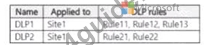
The DIP rule matches for each tile are shown in the following table.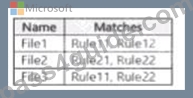
How many DIP policy matches events will be added to Activity explorer, and how many policy matches will be added to the DLP incidents report? To answer, select the appropriate options m the answer area.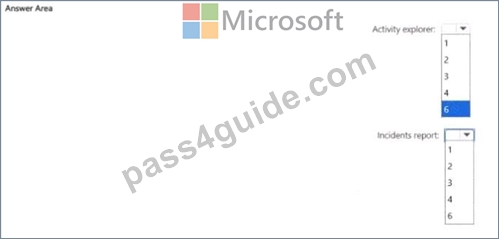
Answer:
Explanation:
Explanation:
NEW QUESTION # 46
HOTSPOT
You have a Microsoft 365 E5 subscription that uses Microsoft Purview.
You need ensure that an incident will be generated when a user visits a phishing website.
What should you do? To answer, select the appropriate options in the answer area.
NOTE: Each correct selection is worth one point.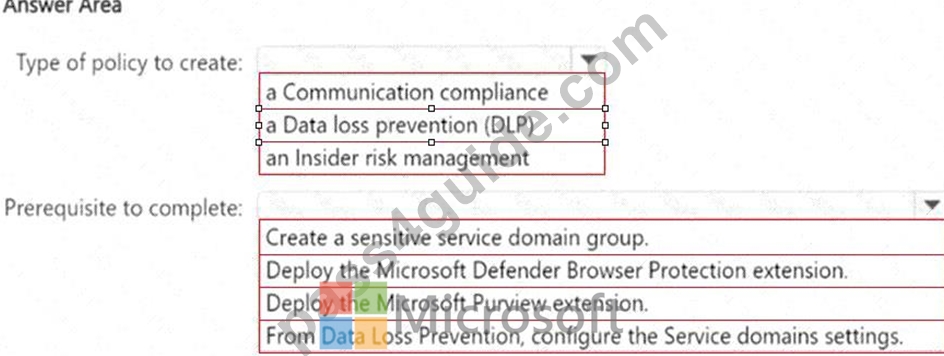
Answer:
Explanation: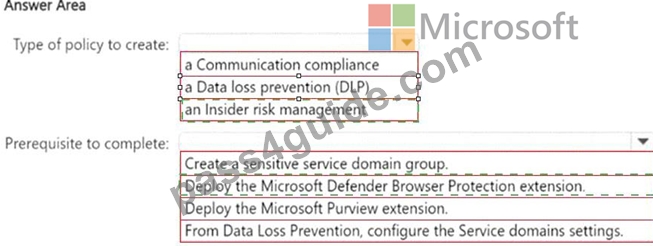
Explanation: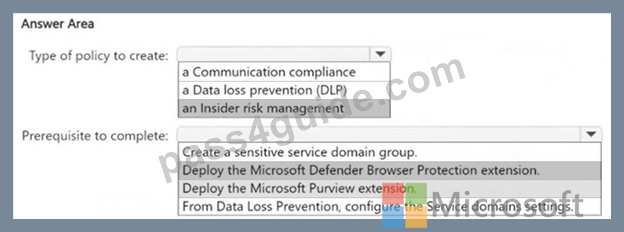
Box 1: Insider Risk Management policies in Microsoft Purview can be configured to detect risky behavior, such as accessing phishing websites. These policies monitor user activity, generate alerts, and help organizations investigate potential security threats.
Box 2: Microsoft Defender Browser Protection extension helps in detecting unsafe or phishing websites and integrating this detection with Insider Risk Management policies. This extension works with Microsoft Edge and Google Chrome to identify risky browsing activity and trigger alerts.
NEW QUESTION # 47
You have a Microsoft 365 E5 tenant.
You create a data loss prevention (DLP) policy.
You need to ensure that the policy protects documents in Microsoft Teams chat sessions.
Which location should you enable in the policy?
- A. OneDrive accounts
- B. Exchange email
- C. Teams chat and channel messages
- D. SharePoint sites
Answer: A
NEW QUESTION # 48
You have a Microsoft 365 E5 tenant that contains a user named User1. User1 is assigned the Compliance Administrator role. User1 cannot view the regular expression in the IP Address sensitive info type. You need to ensure that User! can view the regular expression. What should you do?
- A. Instruct User1 to use the Test function on the sensitive info type.
- B. Assign User1 the Global Reader role.
- C. Create a copy of the IP Address sensitive info type and instruct User1 to edit the copy.
- D. Assign Used to the Reviewer role group
Answer: C
Explanation:
Step 1 - Problem statement
User1 has the Compliance Administrator role but cannot view the regular expression in the built-in IP Address sensitive info type.
This is expected because:
Microsoft provides a large set of built-in sensitive info types (SITs).
For these built-in SITs, the underlying regular expressions, keywords, or detection logic are not exposed to administrators for security reasons.
As a result, even with Compliance Administrator privileges, User1 cannot directly see or modify the regex in the built-in IP Address SIT.
Step 2 - Microsoft solution
To view or modify the regex:
You must create a copy of the built-in SIT.
Once copied, the new custom SIT allows you to edit and view the regex and supporting elements.
This is the only supported way to customize or examine the detection logic.
# Reference: Create a custom sensitive information type
"You can't directly modify the definitions of built-in sensitive information types, but you can create a copy of an existing SIT and then edit it." Step 3 - Why not the other options?
A). Reviewer role group # Reviewers are for records management/discovery, not SIT regex visibility.
C). Test function # Allows you to test SIT detection but does not reveal the regex.
D). Global Reader role # Read-only access, does not expose regex definitions either.
NEW QUESTION # 49
You have a Microsoft 365 sensitivity label that is published to all the users in your Microsoft Entra tenant as shown in the following exhibit.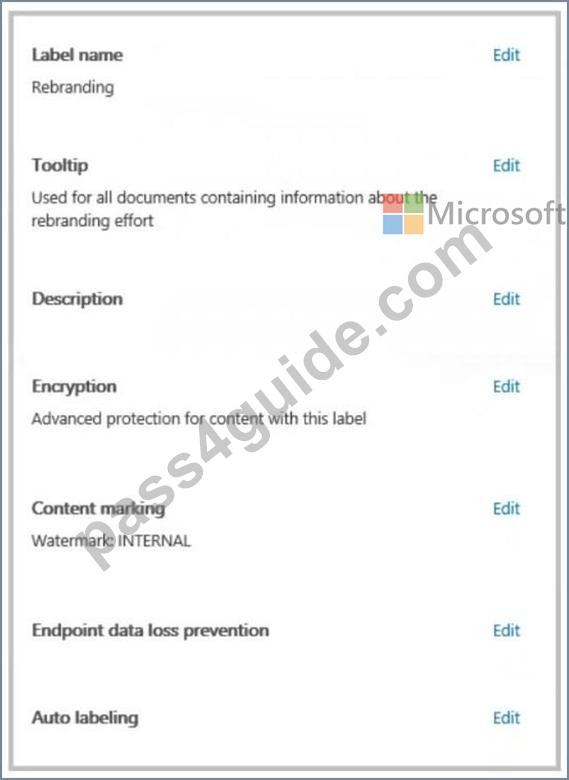
For each of the following statements, select Yes if the statement is true. Otherwise, select No.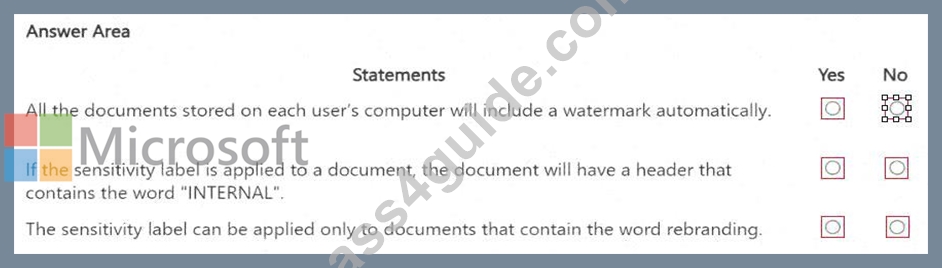
Answer:
Explanation: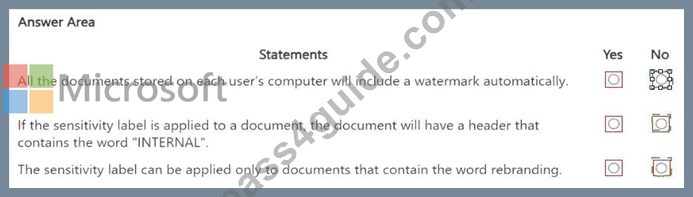
Explanation: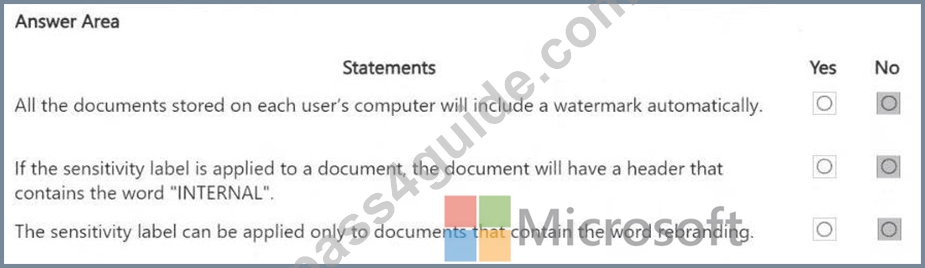
Statement 1 - No. The sensitivity label includes content marking (watermark: INTERNAL), but it only applies to documents where the label is manually or automatically applied, not to all documents by default.
Statement 2 - No. The sensitivity label only specifies a watermark, not a header. If a header marking was configured, it would explicitly appear in the label settings.
Statement 3 - No. There is no indication that auto-labeling is configured to apply the label only to documents with the word "rebranding". Auto-labeling is an optional setting that needs explicit configuration.
NEW QUESTION # 50
You implement Microsoft 36S Endpoint data loss pi event ion (Endpoint DIP).
You have computer that run Windows 11 and have Microsoft 365 Apps instated The computers are joined to a Microsoft Entra tenant You need to ensure that endpoint DIP policies can protect content on the computers.
Solution: You deploy the Microsoft Purview Information Protection client to the computers.
Does this meet the goal?
- A. Yes
- B. No
Answer: B
Explanation:
Step 1 - Scenario
Endpoint Data Loss Prevention (Endpoint DLP) is implemented in Microsoft 365.
Computers: Windows 11, joined to Microsoft Entra (Azure AD), with Microsoft 365 Apps installed.
Goal: Ensure Endpoint DLP policies can protect local content on these devices.
Step 2 - How Endpoint DLP works
Endpoint DLP builds on the same policy framework as Microsoft Purview DLP, but specifically extends coverage to Windows 10/11 devices.
Requirements:
Devices must be onboarded to Microsoft Purview (via Microsoft Defender for Endpoint or via Purview device onboarding).
Endpoint DLP does not require the Microsoft Purview Information Protection (MIP) client.
The MIP client is only required for sensitivity labeling and AIP functionality, not for Endpoint DLP.
Step 3 - Why the proposed solution is incorrect
Deploying the Microsoft Purview Information Protection client does not enable Endpoint DLP.
Endpoint DLP requires device onboarding into Microsoft Purview compliance.
Therefore, this solution does not meet the goal.
Step 4 - Microsoft Reference
Microsoft Docs states:
"To use Endpoint data loss prevention (Endpoint DLP), devices must be onboarded to the Microsoft Purview compliance portal. Installing the Microsoft Information Protection client is not required." Reference: Get started with Endpoint DLP Final Answer No - deploying the Microsoft Purview Information Protection client alone does not meet the goal.
Would you like me to also provide the correct solution (the exact steps required to onboard devices for Endpoint DLP protection)?
NEW QUESTION # 51
You have a Microsoft 365 E5 tenant that contains a sensitivity label named label1.
You plan to enable co-authoring for encrypted files.
You need to ensure that files that have label1 applied support co-authoring.
Which two settings should you modify? To answer, select the settings in the answer area.
NOTE: Each correct selection is worth one point.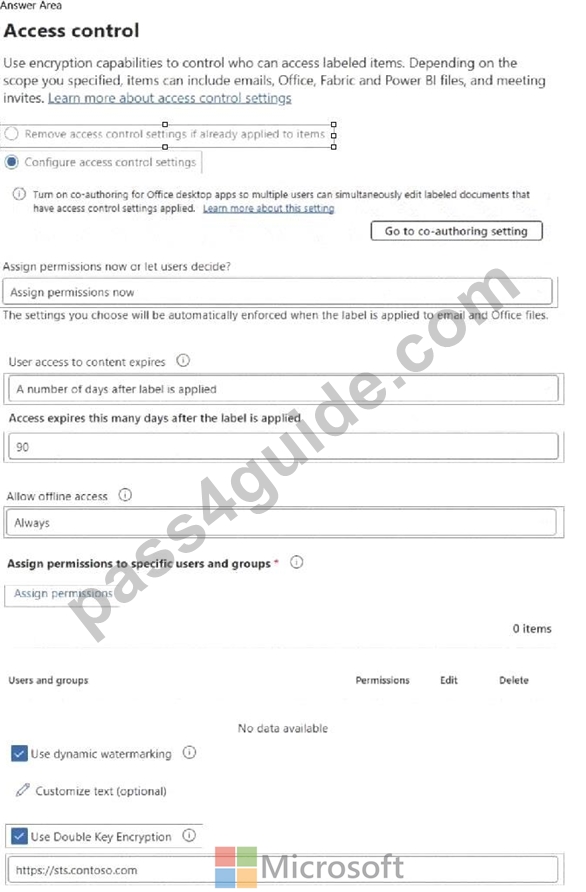
Answer:
Explanation: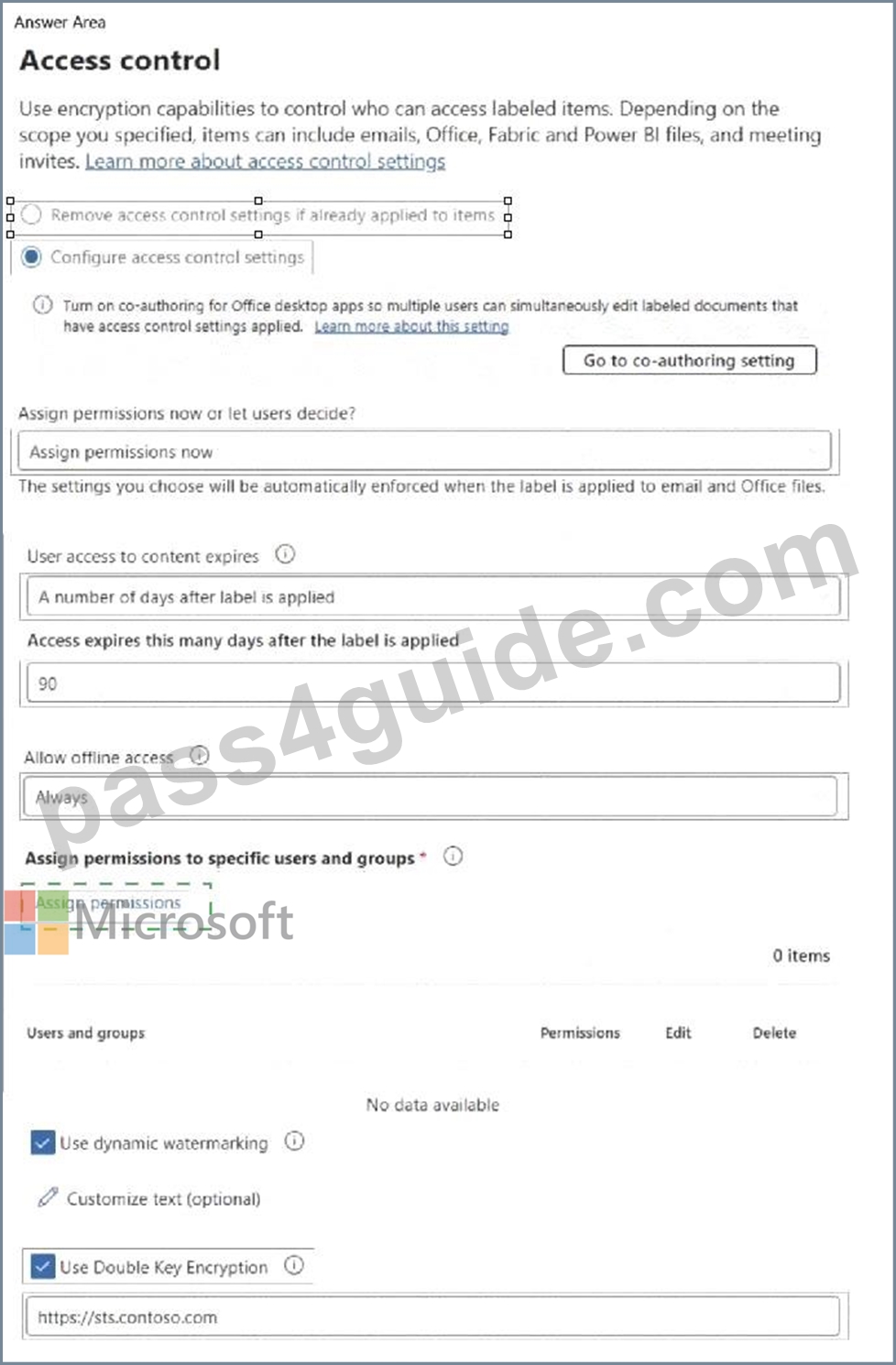
Explanation: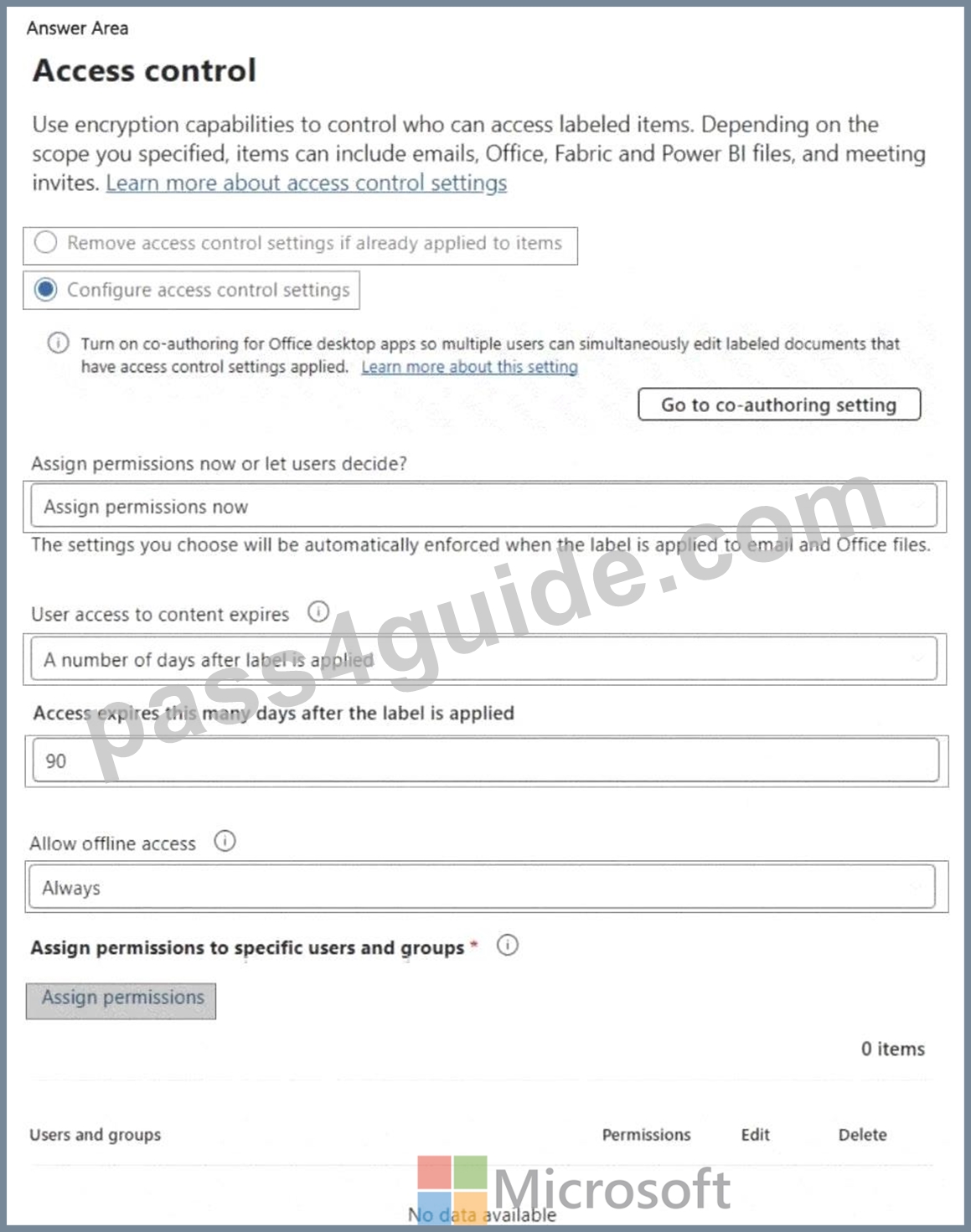
NEW QUESTION # 52
You have a sensitive information type based on a trainable classifier.
You are unsatisfied with the result of the trainable classifier.
You need to retrain the classifier.
What should you use in the Microsoft Purview portal?
- A. Labels from Information governance
- B. Content search
- C. Content explorer from Data classification
- D. Labels from Information protection
Answer: C
NEW QUESTION # 53
You have a Microsoft 365 E5 subscription.
You need to review a Microsoft 365 Copilot usage report.
From where should you review the report?
- A. DSPM for Al in the Microsoft Purview portal
- B. the Microsoft Defender portal
- C. Information Protection in the Microsoft Purview portal
- D. the Microsoft 365 admin center
Answer: A
Explanation:
To review a Microsoft 365 Copilot usage report, you need to use Data Security Posture Management for AI (DSPM for AI) in the Microsoft Purview portal. DSPM for AI provides insights into AI-related activities, including Copilot usage, risk assessments, and data security posture related to AI interactions within Microsoft 365.
NEW QUESTION # 54
You have a Microsoft 365 E5 subscription.
You have a file named Customer.csv that contains a list of 1,000 customer names.
You plan to use Customer.csv to classify documents stored in a Microsoft SharePoint Online library.
What should you create in the Microsoft Purview portal, and which type of element should you select? To answer, select the appropriate options in the answer area.
NOTE: Each correct selection is worth one point.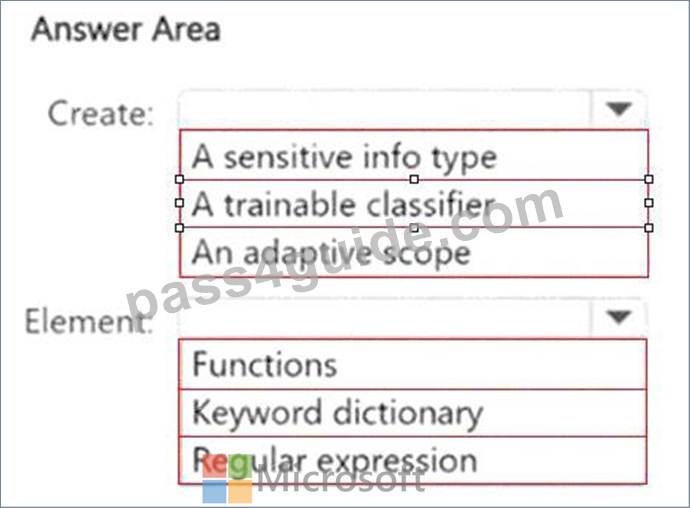
Answer:
Explanation: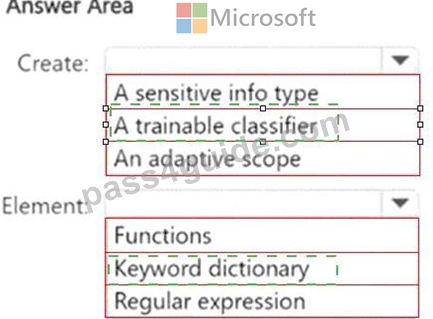
Explanation: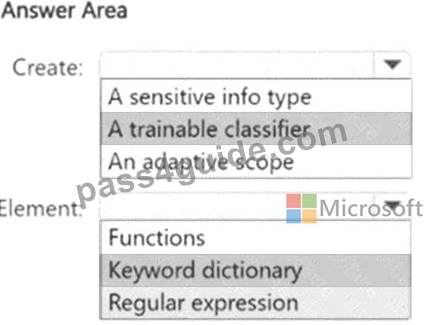
NEW QUESTION # 55
......
Real Updated SC-401 Questions & Answers Pass Your Exam Easily: https://prepcram.pass4guide.com/SC-401-dumps-questions.html